How to Choose AI Campaign Management Software for an Agency
A practical guide to evaluating AI campaign management software for paid media agencies, including monitoring, approvals, reporting, and multi-client workflows.
AI campaign management software should do more than generate campaign ideas. For an agency, the real value comes from connecting campaign data, client context, approvals, reporting, and day-to-day execution in one operating workflow.
The difference matters. A generic AI tool can help write a brief or summarize a pasted export. An agency campaign management platform has to support multiple clients, multiple ad accounts, different goals, brand constraints, approvals, and reporting expectations.
This guide outlines what to look for when evaluating AI campaign management software for paid media teams.
Start With the Agency Workflow, Not the AI Feature List
Most agencies do not need another place to ask a chatbot for ideas. They need fewer manual checks, fewer disconnected spreadsheets, faster reporting, and clearer priorities across the client portfolio.
Before comparing tools, map the recurring work that happens for every client:
- Campaign health checks
- Budget pacing reviews
- Creative fatigue monitoring
- Weekly or monthly reporting
- Account manager updates
- Launch QA
- Optimization recommendations
- Competitor research
The right software should reduce the operational load around these tasks while keeping senior team members in control of strategy and approvals.
Multi-Client Visibility Is Non-Negotiable
In-house marketing teams usually manage one brand. Agencies manage many. That makes portfolio visibility one of the most important requirements.
Look for software that can show:
- Which clients are healthy
- Which campaigns need attention
- Which accounts have budget or pacing risk
- Which reports are ready
- Which tasks are waiting on review
Without a cross-client view, your team still has to check every account manually and decide what matters. That defeats the purpose of automation.
The AI Should Work From Client Context
Campaign recommendations are only useful when they respect the client's business, budget, targets, and constraints.
Useful client context includes:
- Primary business goals
- Budget guardrails
- Target CPA, ROAS, or lead quality expectations
- Brand voice and offer constraints
- Approved landing pages and assets
- Past campaign history
- Reporting cadence
- Approval rules
If the software cannot attach this context to the campaign workflow, recommendations will often be too generic for agency work.
Monitoring Should Produce Actions, Not Noise
Campaign monitoring is only valuable if it helps the team decide what to do next. A dashboard full of numbers is not the same as an operating system.
Strong monitoring should surface:
- Budget anomalies
- Spend pacing problems
- Performance drops
- Ad fatigue signals
- Launch issues
- Unusual account movement
- Optimization opportunities
The best systems also explain why the alert matters and what the team should review next.
Approvals and Guardrails Matter
AI campaign management does not mean removing human judgment. Agencies still own the client relationship, strategy, and accountability.
Look for approval controls that let teams:
- Review suggested changes before they go live
- Edit recommendations
- Reject actions that do not fit the strategy
- Set account-specific guardrails
- Keep a record of what changed
This is especially important for agencies managing regulated industries, large budgets, or clients with strict brand requirements.
Reporting Should Explain the Work
Clients do not only want metrics. They want to know what happened, why it happened, what the agency did, and what comes next.
AI reporting is useful when it combines:
- Performance metrics
- Campaign changes
- Anomaly explanations
- Optimization context
- Next-step recommendations
- Plain-language summaries
This turns reporting from a data export into a client communication workflow.
Questions to Ask Vendors
When comparing AI campaign management platforms, ask:
- Does it support multiple clients and workspaces?
- Can it connect to the ad platforms we manage?
- Does it monitor campaigns continuously?
- Can we control approvals before changes are applied?
- Does it generate client-ready reports?
- Does it store client-specific context?
- Can account managers and media buyers work from the same view?
- Does it help prioritize which account needs attention first?
The answers will show whether the product is built for agency operations or just AI-assisted content generation.
Where Effective Ads Fits
Effective Ads is built for agencies that need an AI-powered operating layer around paid media work. It brings monitoring, optimization support, client context, launch coordination, and reporting into one workspace.
The goal is not to replace the media buyer. The goal is to remove repeated operational work so agencies can manage more clients with clearer visibility and better client communication.
If your team is still checking every account manually, rebuilding every report from scratch, and switching between platforms all day, AI campaign management software can become a real capacity unlock.
Related Posts
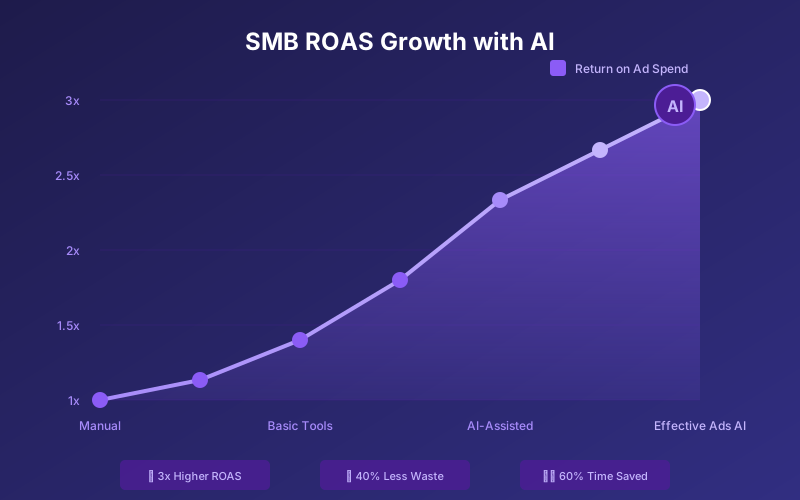
Why Agencies Are Driving 3x Higher ROAS with AI Advertising in 2026
How marketing agencies and advertisers use AI-powered tools like Effective Ads AI to lift client ROAS, cut wasted spend, and manage more accounts without adding headcount.
Read more
Paid Media Automation: What Agencies Should Automate First
A practical framework for paid media agencies deciding which campaign monitoring, reporting, launch, and optimization workflows to automate first.
Read more
White-Label Client Reporting: What Paid Media Agencies Need Beyond Dashboards
Learn what makes white-label client reporting useful for agencies, including written analysis, campaign context, branding, and recurring reporting workflows.
Read more